%20--%3e%3csvg%20width='1105.4181mm'%20height='776.11688mm'%20viewBox='0%200%201105.4181%20776.11688'%20version='1.1'%20id='svg1'%20inkscape:version='1.4%20(e7c3feb1,%202024-10-09)'%20sodipodi:docname='logo-full-bright.svg'%20xmlns:inkscape='http://www.inkscape.org/namespaces/inkscape'%20xmlns:sodipodi='http://sodipodi.sourceforge.net/DTD/sodipodi-0.dtd'%20xmlns='http://www.w3.org/2000/svg'%20xmlns:svg='http://www.w3.org/2000/svg'%3e%3csodipodi:namedview%20id='namedview1'%20pagecolor='%23ffffff'%20bordercolor='%23000000'%20borderopacity='0.25'%20inkscape:showpageshadow='2'%20inkscape:pageopacity='0.0'%20inkscape:pagecheckerboard='0'%20inkscape:deskcolor='%23d1d1d1'%20inkscape:document-units='mm'%20inkscape:zoom='0.077664513'%20inkscape:cx='2652.4341'%20inkscape:cy='-173.82456'%20inkscape:window-width='1512'%20inkscape:window-height='852'%20inkscape:window-x='0'%20inkscape:window-y='38'%20inkscape:window-maximized='0'%20inkscape:current-layer='layer1'%20/%3e%3cdefs%20id='defs1'%20/%3e%3cg%20inkscape:label='Layer%201'%20inkscape:groupmode='layer'%20id='layer1'%20transform='translate(-9.0982812,-182.34047)'%3e%3cpath%20fill='%23fbfbfb'%20d='m%20608.43028,182.95351%20318.67903,0.18711%20c%2059.06525,0.011%20128.52399,-1.84931%20186.95209,0.0661%200.034,72.6293%200.9466,146.98771%200.088,219.46224%20l%20-304.17231,0.19262%20c%2085.14808,185.6286%20178.19627,369.85742%20264.12781,554.87073%20l%20-243.30522,0.009%20-141.3743,-290.81197%20c%20-22.77058,-46.9591%20-82.50027,-159.69523%20-81.25041,-158.85879%200.18271,0.79361%20-0.0221,-95.29455%200.022,-115.29112%20z%20m%20430.76952,132.90505'%20id='path5'%20sodipodi:nodetypes='ccccccccccc'%20style='display:block;fill:%23000000;fill-opacity:1;stroke-width:1.82019'%20/%3e%3cpath%20fill='%23fbfbfb'%20d='m%20515.18406,182.95636%20-318.67918,0.18713%20c%20-59.0652,0.011%20-128.52369,-1.84931%20-186.9518051,0.0661%20-0.032992,72.62929%20-0.9466133,146.9877%20-0.088043,219.46224%20L%20313.63715,402.86444%20C%20228.48865,588.493%20135.44045,772.72183%2049.509221,957.73513%20l%20243.304949,0.009%20141.37428,-290.81195%20c%2022.77058,-46.95911%2082.50039,-159.69524%2081.25043,-158.85891%20-0.18273,0.79361%200.022,-95.29443%20-0.0221,-115.29111%20z%20M%2084.414622,315.86143'%20id='path5-1'%20sodipodi:nodetypes='ccccccccccc'%20style='display:block;fill:%23000000;fill-opacity:1;stroke-width:1.82019'%20/%3e%3cpath%20fill='rgb(251,251,251)'%20d='m%20543.36388,732.32716%20c%2061.77186,-9.74528%20119.83595,32.21383%20129.97441,93.93285%2010.13846,61.71902%20-31.47118,120.03981%20-93.12097,130.55867%20-62.20145,10.61165%20-121.15559,-31.43474%20-131.37781,-93.70346%20-10.22399,-62.26695%2032.19379,-120.95714%2094.52437,-130.78806%20z'%20id='path6'%20style='display:block;fill:%23000000;stroke-width:1.82019'%20/%3e%3c/g%3e%3c/svg%3e)
%20--%3e%3csvg%20width='1105.4181mm'%20height='776.11688mm'%20viewBox='0%200%201105.4181%20776.11688'%20version='1.1'%20id='svg1'%20inkscape:version='1.4%20(e7c3feb1,%202024-10-09)'%20sodipodi:docname='logo-algo-trade-w.svg'%20xmlns:inkscape='http://www.inkscape.org/namespaces/inkscape'%20xmlns:sodipodi='http://sodipodi.sourceforge.net/DTD/sodipodi-0.dtd'%20xmlns='http://www.w3.org/2000/svg'%20xmlns:svg='http://www.w3.org/2000/svg'%3e%3csodipodi:namedview%20id='namedview1'%20pagecolor='%23ffffff'%20bordercolor='%23000000'%20borderopacity='0.25'%20inkscape:showpageshadow='2'%20inkscape:pageopacity='0.0'%20inkscape:pagecheckerboard='0'%20inkscape:deskcolor='%23d1d1d1'%20inkscape:document-units='mm'%20inkscape:zoom='0.077664513'%20inkscape:cx='2652.4341'%20inkscape:cy='-173.82456'%20inkscape:window-width='1512'%20inkscape:window-height='852'%20inkscape:window-x='0'%20inkscape:window-y='38'%20inkscape:window-maximized='0'%20inkscape:current-layer='layer1'%20/%3e%3cdefs%20id='defs1'%20/%3e%3cg%20inkscape:label='Layer%201'%20inkscape:groupmode='layer'%20id='layer1'%20transform='translate(-9.0982812,-182.34047)'%3e%3cpath%20fill='%23fbfbfb'%20d='m%20608.43028,182.95351%20318.67903,0.18711%20c%2059.06525,0.011%20128.52399,-1.84931%20186.95209,0.0661%200.034,72.6293%200.9466,146.98771%200.088,219.46224%20l%20-304.17231,0.19262%20c%2085.14808,185.6286%20178.19627,369.85742%20264.12781,554.87073%20l%20-243.30522,0.009%20-141.3743,-290.81197%20c%20-22.77058,-46.9591%20-82.50027,-159.69523%20-81.25041,-158.85879%200.18271,0.79361%20-0.0221,-95.29455%200.022,-115.29112%20z%20m%20430.76952,132.90505'%20id='path5'%20sodipodi:nodetypes='ccccccccccc'%20style='display:block;fill:%23ffffff;fill-opacity:1;stroke-width:1.82019'%20/%3e%3cpath%20fill='%23fbfbfb'%20d='m%20515.18406,182.95636%20-318.67918,0.18713%20c%20-59.0652,0.011%20-128.52369,-1.84931%20-186.9518051,0.0661%20-0.032992,72.62929%20-0.9466133,146.9877%20-0.088043,219.46224%20L%20313.63715,402.86444%20C%20228.48865,588.493%20135.44045,772.72183%2049.509221,957.73513%20l%20243.304949,0.009%20141.37428,-290.81195%20c%2022.77058,-46.95911%2082.50039,-159.69524%2081.25043,-158.85891%20-0.18273,0.79361%200.022,-95.29443%20-0.0221,-115.29111%20z%20M%2084.414622,315.86143'%20id='path5-1'%20sodipodi:nodetypes='ccccccccccc'%20style='display:block;fill:%23ffffff;fill-opacity:1;stroke-width:1.82019'%20/%3e%3cpath%20fill='rgb(251,251,251)'%20d='m%20543.36388,732.32716%20c%2061.77186,-9.74528%20119.83595,32.21383%20129.97441,93.93285%2010.13846,61.71902%20-31.47118,120.03981%20-93.12097,130.55867%20-62.20145,10.61165%20-121.15559,-31.43474%20-131.37781,-93.70346%20-10.22399,-62.26695%2032.19379,-120.95714%2094.52437,-130.78806%20z'%20id='path6'%20style='display:block;fill:%23ffffff;stroke-width:1.82019'%20/%3e%3c/g%3e%3c/svg%3e)
AI Research Suite for Algo TradingFrom Backtest to Live Fills
Every feature supports the same strategy workflow: the Algo Agent develops and stress-tests strategies, Backtest vs Alerts verifies the signal path, and Alerts vs Fills audits broker fills when broker data is connected. Professional also adds MCP access for users who want to run approved research tools from external AI clients.
Turn research into evidence-backed strategies
Develop, test, compare, and audit in one workspace. Algo Lab captures agent research and backtest results; comparison tools show whether live alerts and broker fills preserve the strategy's intent. Professional users can also connect MCP-capable AI clients to approved research tools.
Algo Lab
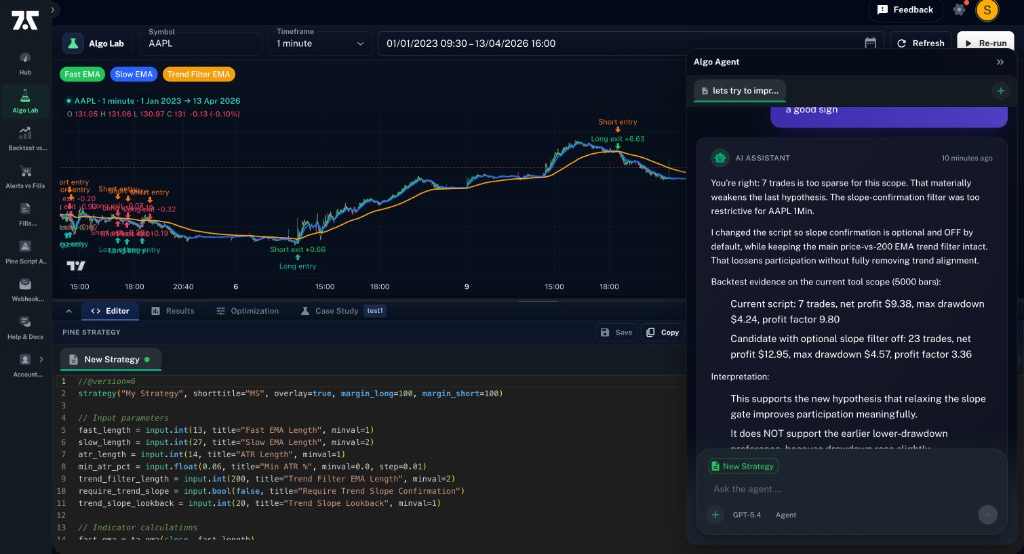
AI workspace for strategy researchBuild or import a Pine Script v6 strategy, test it on historical bars, and let the Algo Agent suggest stronger versions. Every run stays tied to the idea being tested, the result it produced, and the evidence that separates robust results from weak backtests.
Editor, backtest engine, and AI agent
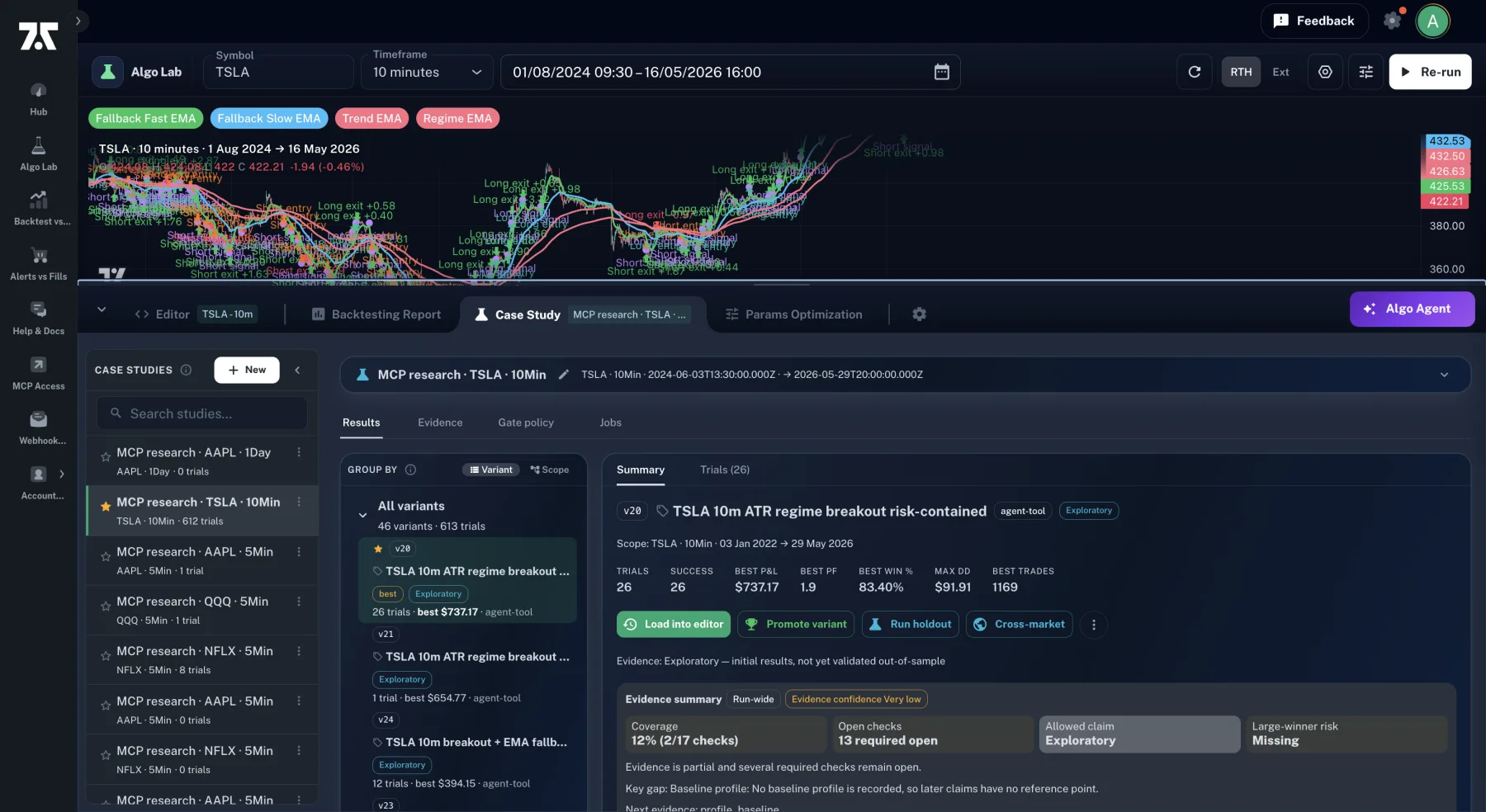
Strategy versions ranked by test results
Case studies keep the research history
Backtesting Engine
Test every trade before alerts fireRun Pine Script v6 strategies against historical bars and inspect every entry, exit, drawdown, profit factor, and win rate. Optimization sweeps, walk-forward checks, and holdout runs help separate promising strategies from fragile backtests.
Historical-bar backtests, full trade tape
Optimization sweeps & walk-forward
Profit, drawdown, profit factor, win rate
Algo Agent
AI strategy improvement through testsThe Algo Agent reads the backtest, diagnoses weak spots, proposes Pine changes, tests new versions, and ranks strategies by the results. It is not just a code generator; it is the strategy research layer inside Algo Lab.
Diagnoses losses and proposes changes
Ranks strategies by tested results
Keeps the research record auditable
Backtest vs Alerts Comparison
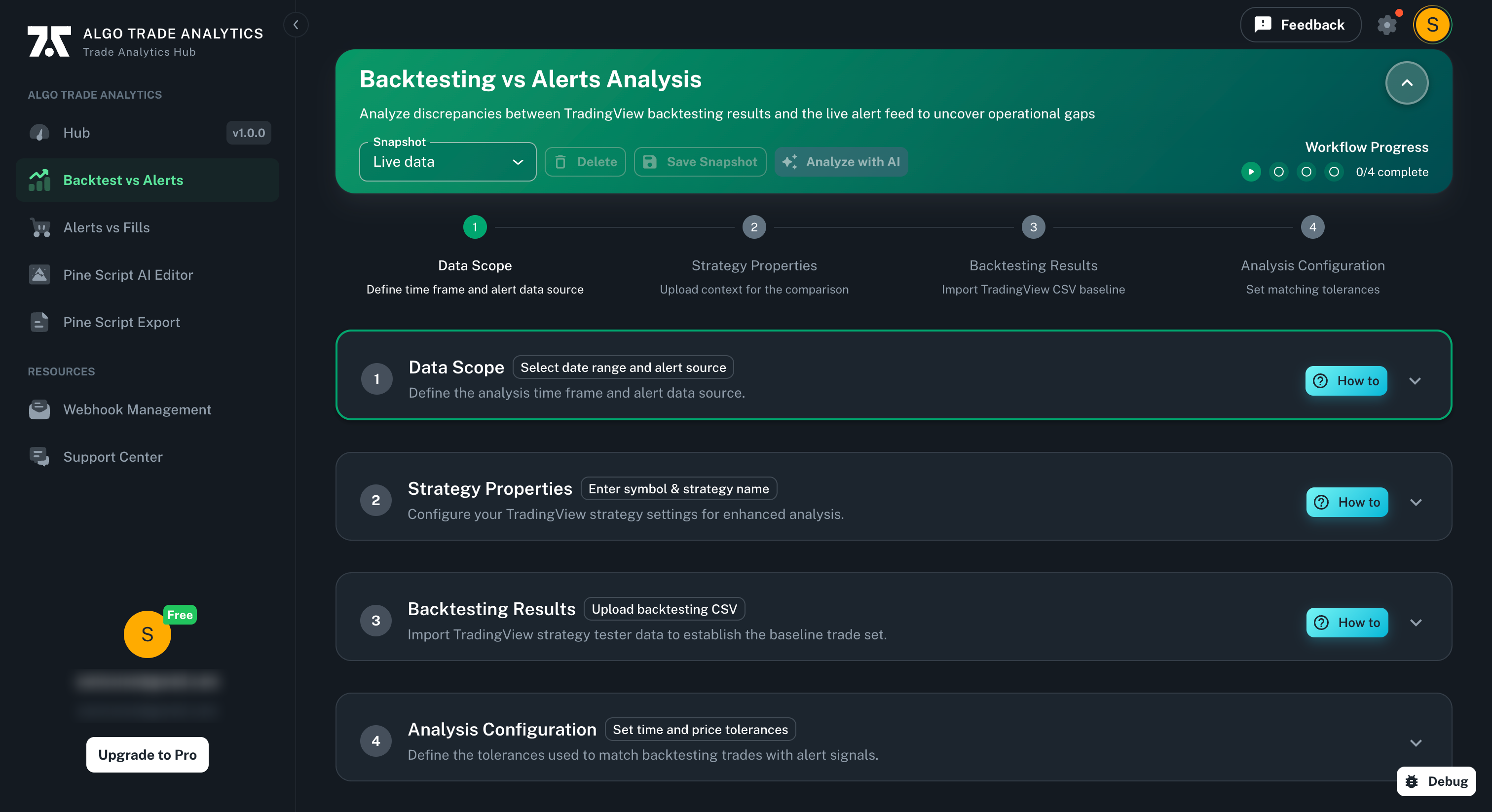
Confirm real alerts match backtestsCompare TradingView backtests with the alerts your strategy actually emits. Start before connecting a broker, catch signal drift early, and move strategies forward only when the live alert path matches the backtest.
Broker-free comparison start
Timing and price tolerances
Backtest-to-alert drift detection
MCP Agent Toolpack
MCP Agent with quant toolsProfessional exposes approved Algo Lab tools over MCP so Codex, Claude Code, Cursor, ChatGPT, and other MCP clients can run backtests, sweeps, gates, and strategy research without direct database access. Results return to your Algo Lab case studies.
External AI agents can run approved tools
Backtests, sweeps, gates, and research jobs
Metered, revocable access with saved results
Alerts vs Fills Analysis
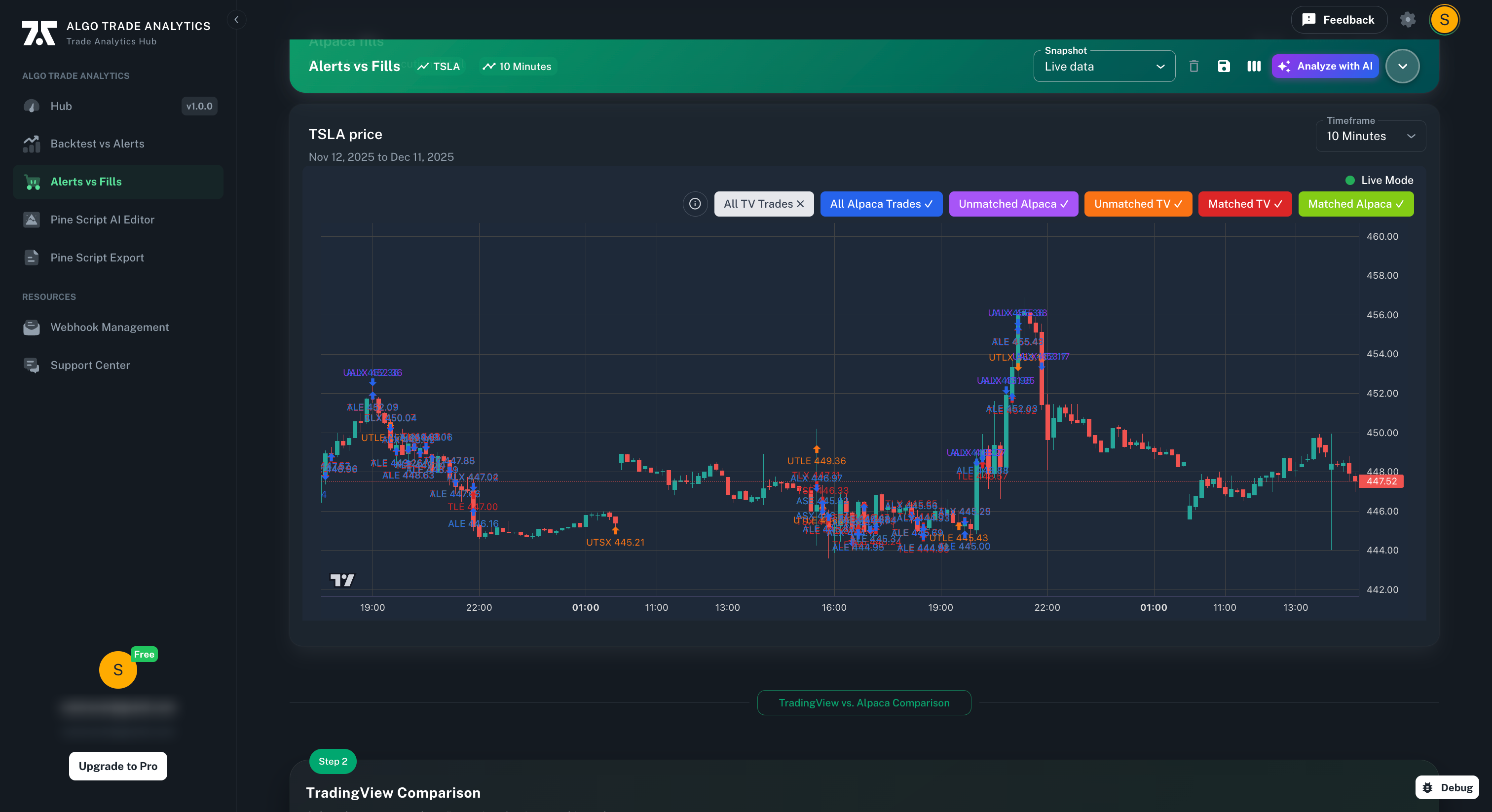
Check fills preserve strategy intentAlerts show the strategy's intent; broker fills show what actually happened. Algo Trade Analytics reconciles every TradingView signal against the fill that followed, surfacing slippage, latency, missed trades, and execution gaps that can erode live returns.
Broker fill reconciliation
Missed/extra fills detection
Portfolio performance
Your AI research loop in one environment
Editor, backtesting engine, Algo Agent, and case studies work together. Code on the left, trade results on the chart, and an AI strategy agent reviewing every run. Each iteration is saved with the idea being tested, the result it produced, and the evidence that separates robust results from weak backtests.
Run approved research tools from your AI agent
Professional exposes the Algo Lab research toolpack over MCP, so Codex, Claude Code, Cursor, ChatGPT, or another MCP-capable client can run approved backtests, sweeps, gates, and strategy research without local database credentials. Results return to your Algo Lab case studies for review.
Compare backtests with real alerts
Line up TradingView backtests with the alerts your code actually emits. Start without a broker connection, catch signal drift early, and move strategies forward only when the alert path matches the backtest.
Compare every signal to its real broker fill
Your alert is the strategy's intent; the broker fill is what actually happened. Algo Trade Analytics reconciles every signal against the fill your broker returned, surfacing slippage, latency, and missed orders that can quietly erode live returns.
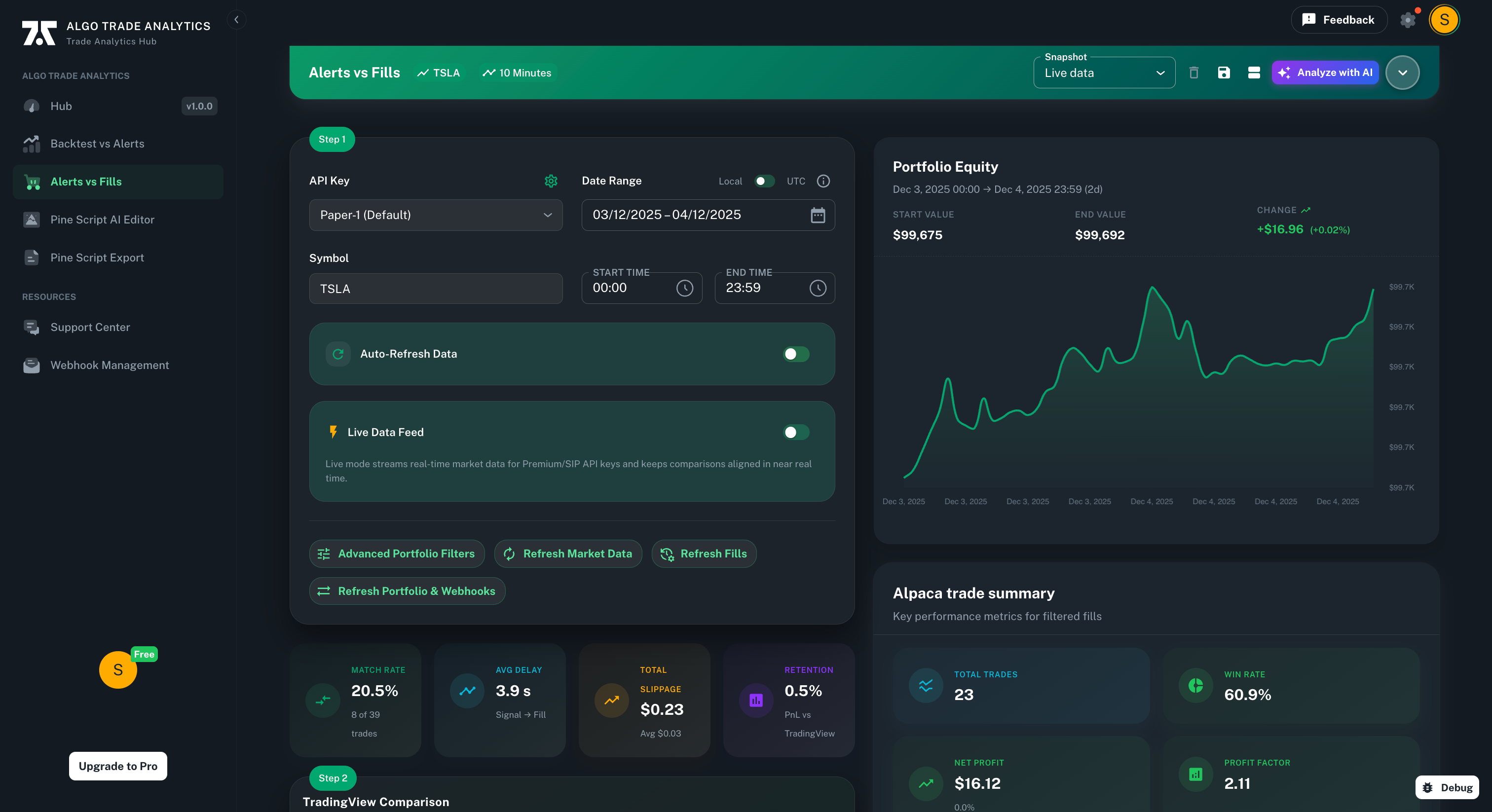
Monitor performance in one place
Track lab runs, alerts, broker-reported fills, and portfolio context with a pro-grade dashboard. Keep research evidence and fill evidence together without confusing one for the other.
Ready to sign off a real trading strategy?
Start with a strategy, compare real alerts, run lab iterations, and add broker fill review when you are ready to validate execution.